

TL;DR
SharePoint migration projects often fail for predictable reasons. Learn the five most common challenges businesses face and the best practices that help prevent costly delays and post-migration disruptions.
According to Gartner, 83% of data migration projects either fail or overrun their budgets and schedules.
SharePoint migration often falls into this category because it appears much simpler than it really is. Moving content from a legacy ECM platform or an on-premises SharePoint environment into SharePoint Online may seem straightforward until permissions don’t carry over, metadata is lost or mapped incorrectly, and users struggle to find content that was successfully migrated.
Experian’s Data Quality Benchmark Report highlights how common these challenges are:
- Only 36% of migration projects stay within their original budget.
- 54% of migration projects experience delays.
These outcomes result from overlooked planning, incomplete analysis, or underestimating the complexity of enterprise content. The good news is that these challenges follow familiar patterns, and with the right preparation, most of them can be avoided.
In this article, we’ll explore the five most common reasons SharePoint migration projects fail and the practical steps companies can take to ensure a smoother, more successful migration.
1. Skipping Discovery and Planning
You can’t migrate what you don’t fully understand.
Many SharePoint migration projects begin with the assumption that content can simply be copied from one environment to another.
SharePoint contains years of accumulated documents, metadata, content types, permissions, and workflows. Without understanding the source environment, companies risk migrating redundant content and carrying outdated permissions.
2. Overlooking Permissions
Moving permissions is one thing. But preserving the right permissions is another.
Permissions are one of the most overlooked aspects of SharePoint migration, yet they’re essential to both security and productivity.
Over time, environments accumulate inherited permissions, inactive users, outdated security groups, and external access that no longer reflect business needs. Migrating these permissions without review can transfer existing security issues into the new environment.
3. Losing the Business Context Behind Your Content
Enterprise content comprises metadata, version history, content types, and site columns that provide the context that makes information searchable, compliant, and useful.
When these elements are lost or incorrectly mapped, documents may still exist, but much of their business value is lost. Search becomes less effective, workflows may fail, and users spend more time looking for information.
4. Broken Links Disrupt Operation
Users notice broken links long before they notice a successful migration.
A migration can be technically successful while still frustrating users. As sites and libraries are reorganized, URLs often change, leaving links in documents, pages, and business applications pointing to locations that no longer exist.
Broken links increase support requests, reduce productivity, and weaken confidence in the new SharePoint environment.
5. Assuming the Migration Ends at Go-Live
Moving content is only the beginning.
Many organizations consider a SharePoint migration complete once the content has been transferred. In reality, go-live marks the start of validation.
Permissions should be verified, missing content identified, and newly created documents synchronized before users fully transition to the new environment.
How Tzunami Helps Reduce SharePoint Migration Risks
Every SharePoint migration project is unique, but the challenges behind unsuccessful migrations are often the same. Tzunami helps organizations address these risks throughout every stage of the migration process.
- Plan before you migrate – Tzunami’s Pre-Migration Analyzer helps companies evaluate data volume, map information architecture, and identify problematic items like broken links or invalid characters.
- Preserve permissions –Tzunami migrates users, groups, and permissions alongside content while supporting permission mapping between source and target environments.
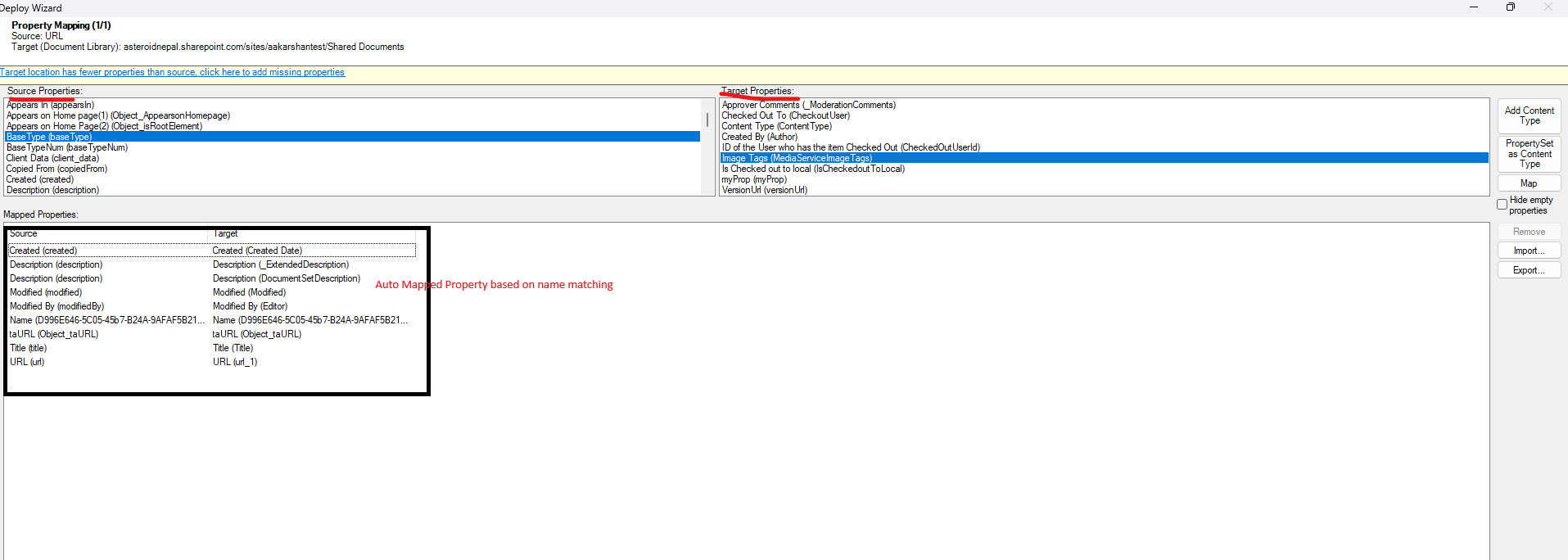
- Maintain business context – Beyond files, Tzunami preserves metadata, version history, content types, site columns, and other business information.
- Reduce disruption after migration – Link Resolver Service and URL Redirection help preserve access to migrated content by redirecting legacy URLs to their new SharePoint locations.
- Validate before users rely on the new environment – Delta Migration and Post-Migration Verification will help with synchronizing content changes and verifying migration results.
Conclusion
A successful SharePoint migration is measured by how well business information, security, and user productivity are preserved throughout the process.
As this article shows, most migration failures are the result of overlooked planning, unmanaged permissions, lost metadata, broken links, or insufficient validation. The good news is that these challenges are predictable and, with the right strategy, largely preventable.