

During cloud migrations, if metadata isn’t mapped correctly, it often leads to stalled or incomplete SharePoint migrations.
With the right approach (and the right toolset), you can overcome metadata issues and complete your migration with confidence.
In this blog, we’ll walk through the most common metadata transfer problems, how they impact your migration, and how Tzunami Deployer helps you fix them.
What Metadata Issues Commonly Delay SharePoint Migrations?
Metadata is the descriptive information attached to your documents like titles, authors, dates, permissions, categories, version history, etc. During a migration to SharePoint, transferring this information correctly is just as important as moving the files themselves.
But here’s where things get messy:
The Most Common Metadata Issues Include:
- Inconsistent or incompatible metadata fields between the source system and SharePoint
- Missing or unmapped metadata (e.g., document type, retention dates, tags)
- Invalid values that don’t align with SharePoint’s field types or character requirements
- Loss of version history when metadata isn’t preserved
- Security mismatches that break permission inheritance
What Causes These Metadata Failures?
The root cause usually lies in mismatched metadata schemas. Every ECM system (like OpenText, Documentum, eRoom, or Confluence) structures its metadata differently. When migrating to SharePoint, those fields often don’t line up 1:1.
For Example:
Let’s say your source system uses a field called “Category Level” with a dropdown of custom values. If SharePoint doesn’t have a matching content type or if that value doesn’t meet SharePoint’s requirements (like a choice list), you’ll hit errors or worse, lose data.
How Can You Fix Metadata Issues Before They Delay Your SharePoint Migration?
To prevent these problems, you need a structured, tool-based approach. Tzunami Deployer solves metadata migration challenges using a 3-step process:
1. Map Your Metadata Fields Before Migration
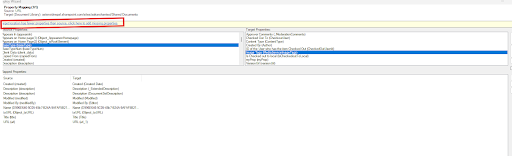
Tzunami allows you to manually or automatically map fields between your source system and SharePoint. This means:
- Matching “Author” fields from OpenText to “Created By” in SharePoint
- Converting date formats or value lists as needed
- Adjusting field types to meet SharePoint’s schema rules
Example: You can map a “Review Status” field from Documentum to a SharePoint choice column; that way, documents retain their review stage metadata after migration.
You Also Have Full Control Over:
- Custom metadata mapping
- New field creation if it does not exist
- Value transformation
- Content type assignment
2. Run Test Migrations To Validate Metadata Results
Before migrating all your content, Tzunami lets you run test (pilot) migrations on selected folders, libraries, or site collections.
This is where you:
- Check if metadata lands correctly in SharePoint
- Verify field names, values, and types
- Review permissions and security
- Catch broken links or unmapped fields early
3. Use Delta Migration To Capture Updates
Even after your initial migration, business doesn’t stop. New documents get added, metadata gets edited. That’s why Tzunami’s Delta Migration is essential.
It Allows You To:
- Migrate only new or changed content
- Keep your SharePoint site in sync with source systems
- Avoid overwriting clean metadata already migrated
- Run fast, incremental updates instead of full re-migrations
This is especially helpful when you’re migrating large document sets over weeks or months, or when multiple departments are involved.
Delta migration ensures no metadata (or content) is left behind.
What Does Before v/s After Look Like With Tzunami?
| Stage | Before Tzunami | After Tzunami |
| Metadata Mapping | Manual, error-prone, mismatched fields | Mapped with precision and automation |
| Test Runs | Limited visibility, trial-and-error | Simulated test runs with review previews |
| Delta Updates | Manual tracking, version loss | One-click incremental delta sync |
| Results | Delays, corrupted data | Smooth, accurate migration |
What Are Common Metadata Mistakes (And How To Avoid Them)?
Mistake 1: Skipping Metadata Mapping
What happens: Fields don’t align; documents lose critical context.
Fix: Use Tzunami’s mapping capabilities to align each field from the source to the destination. If a matching field doesn’t exist in the target, you can create a new one during the mapping process.
Mistake #2: Relying On A Single Migration Run
What happens: New documents or changes after migration are lost.
Fix: Schedule delta migrations to sync updates after go-live.
Key Takeaway
Migrating content is only half the job. Without your metadata, your documents are just files with no context. That’s why metadata migration is critical to a successful SharePoint migration.
CTA Deployer helps you fix these issues. See how
FAQs About Metadata In SharePoint Migrations
1. What Is Metadata In The Context Of SharePoint Migration?
Metadata is the descriptive information attached to documents like author, title, date created, categories, permissions, etc.
2. Why Do Metadata Issues Cause Migration Delays?
Because mismatched or unmapped metadata can break workflows, corrupt files, or stop the migration process entirely.
3. Can Tzunami Preserve Version History and Permissions?
Yes, Tzunami Deployer preserves version history, security settings, and metadata properties during migration.
4. What Is A Test Migration?
A test migration lets you preview how your content and metadata will appear in SharePoint before running a full migration, so you can catch and fix issues early.
5. What Is Delta Migration?
Delta migration means migrating only new or modified content after your initial migration.